Web chat
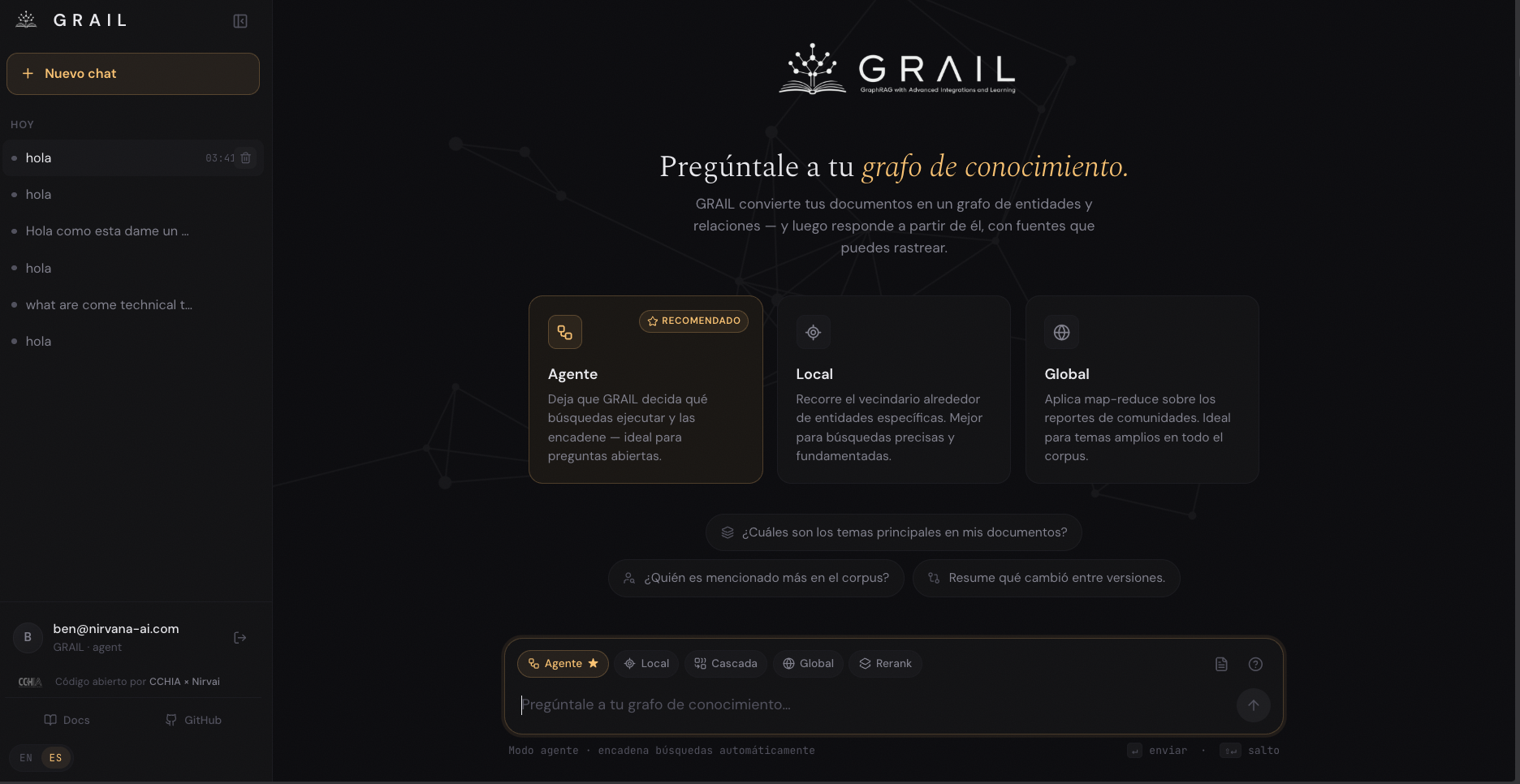
GRAIL ships with a bilingual web chat ready to use — FastAPI backend, React frontend. No extra setup; it serves the chat over your project and you reach it from any browser.
Launch it
uv run grail ui ./my-project
This boots the server at http://127.0.0.1:8765 by default. Open that URL in any browser.
Useful flags:
| Flag | Default | What for |
|---|---|---|
--host, -h | 127.0.0.1 | Bind address. Use 0.0.0.0 to expose on the local network. |
--port, -p | 8765 | Server port. |
--dev | off | Enables CORS for the Vite dev server on :5173. Only if you're iterating on the frontend. |
--debug | off | Prints every LLM prompt and response in the terminal with colors. Handy to understand what the agent did. |
First sign-in
The first time you open the chat it asks you to create an account — username and password. This creates the admin user. After that you can:
- Sign in with that account on later sessions
- Create additional accounts from the user panel
Accounts live in a local SQLite (<project>/.grail/users.db) — they're never synced anywhere.
What you see on screen
Sidebar (left)
- + New chat — start a fresh session.
- Chat list — grouped by date (Today, Yesterday, This week, …). Each chat is auto-titled from your first question.
- Your account at the bottom — email and the active GRAIL mode.
- Language switcher — toggles between ES and EN without reload. The entire UI changes: titles, descriptions, placeholders, and the agent's system prompts.
The web chat is now bilingual ES/EN. The switcher sits in the sidebar footer and persists your preference across sessions.
Welcome screen
Shows up when you open a new chat. Three pieces to get you started without staring at a blinking cursor:
- Animated tagline — "Ask your knowledge graph".
- Recommended mode cards — Agent (recommended), Local, Global with descriptions of when to pick each.
- Suggested questions — clickable chips like "What are the main themes in my documents?".
Mode selector (above the input)
Quick access to the main search modes:
- Agent ⭐ — the LLM decides which mode to call per question. Recommended default.
- Local — entities as anchors.
- Cascade — entities + text rescue. Best for specific facts.
- Global — thematic synthesis over communities.
- Rerank — toggle the cross-encoder reranker on or off.
See the six search modes if you need help picking.
Input and streaming
- Enter sends. Shift+Enter inserts a newline.
- The answer streams in real time — words appear as the LLM thinks.
- Markdown renders with code blocks, tables, lists, and quotes.
- When the agent finishes you see a footer summary: how many LLM calls and the total time.
Sources panel
Each answer optionally opens a side panel with the cited sources: exact files, chunk numbers, relevant snippets. Click any to see the full content.
This is what makes GRAIL not a black box — you can verify where each claim came from.
Access from another machine
If you want to use the chat from your phone or another machine on the LAN:
uv run grail ui ./my-project --host 0.0.0.0 --port 8765
Then on the other device open http://<your-mac-ip>:8765. Careful: this exposes the chat on your LAN, not the public internet.
Per-session behaviour
- Sessions are persisted automatically in
<project>/.grail/chat.db(SQLite). - You can close the chat and pick up where you left off — just open the same session from the side list.
- Each session stores the full history: your questions, the answers, the agent's tool calls, the per-question cost.
If something looks off
| Symptom | Likely cause | Fix |
|---|---|---|
| Chat stuck on "Loading…" | Project hasn't been indexed | Run grail index ./my-project first |
| Empty answers | Question doesn't match any entity | Reshape it with the WHO + WHAT + terms formula |
| 401 on sign-in | Wrong password or corrupted DB | Delete <project>/.grail/users.db and re-register |
Missing dependencies for the chat UI | Missing ui extra | uv pip install -e ".[ui]" |
Next step
- Terminal chat (CLI) — the other chat interface, in Textual TUI with persistent sessions.
- Search modes — how to pick a mode per question.
- Query tracing — debug bad answers.