Terminal chat (CLI)
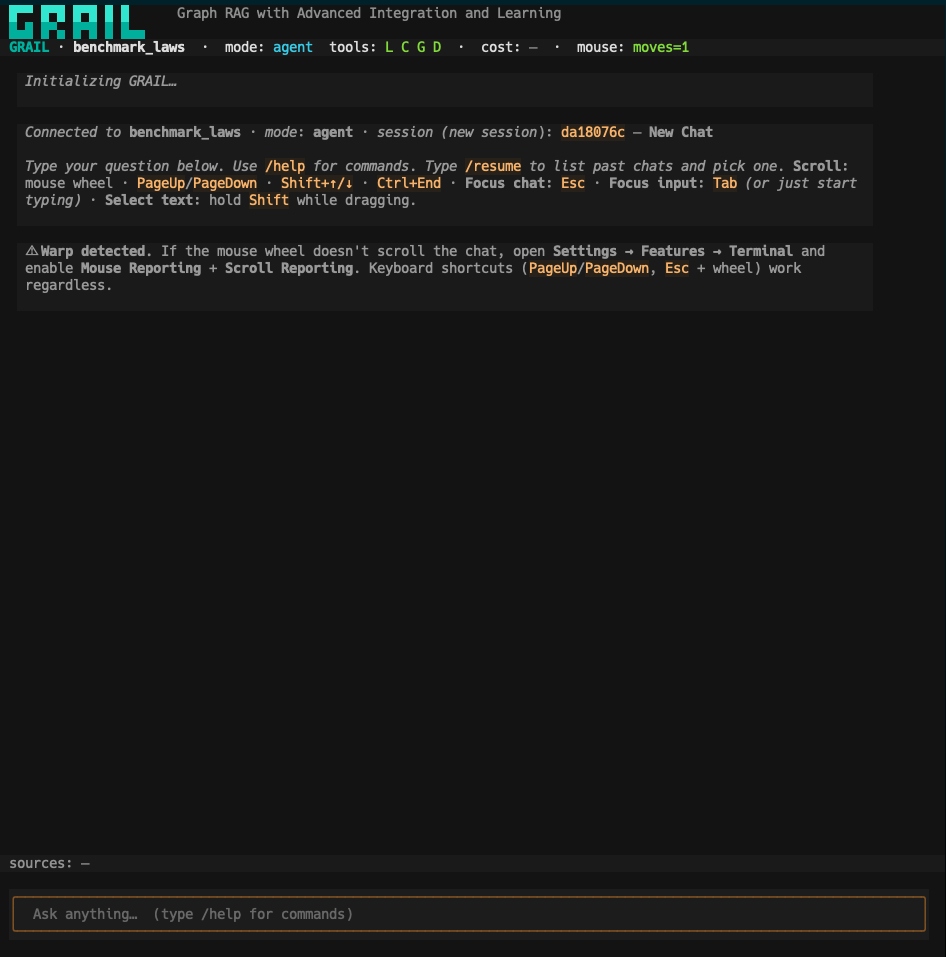
If you live in the terminal and don't want to open a browser, GRAIL ships a full TUI chat (Textual). Streaming, markdown rendering, persistent SQLite sessions, and slash commands.
Launch it
uv run grail chat ./my-project
Opens the chat connected to your indexed project. If there are existing sessions, it asks whether to resume one.
Useful flags:
| Flag | Default | What for |
|---|---|---|
--mode, -m | agent | Initial mode: agent | local | cascade | global | document. |
--session, -s | (new) | Resume an existing session by ID prefix. You can also use /resume from inside. |
--db | <project>/.grail/chat.db | Override the SQLite DB where sessions live. |
What you see at startup
Header
 ██████╗ ██████╗  █████╗ ██╗██╗     Graph RAG with Advanced Integration and Learning
██╔════╝ ██╔══██╗██╔══██╗██║██║
██║  ███╗██████╔╝███████║██║██║
██║   ██║██╔══██╗██╔══██║██║██║
╚██████╔╝██║  ██║██║  ██║██║███████╗
 ╚═════╝ ╚═╝  ╚═╝╚═╝  ╚═╝╚═╝╚══════╝

GRAIL · benchmark_laws · mode: agent · tools: L C G D · cost: — · mouse: moves=1
The status bar (always visible) shows:
- Active project (
benchmark_laws) - Current mode (
agent) - Tools available to the agent (
L C G D= local, cascade, global, document) - Cumulative cost of the session (USD)
- Mouse state — whether your terminal reports scroll/clicks
Welcome screen
Connected to benchmark_laws · mode: agent · session (new session): da18076c — New Chat

Type your question below. Use /help for commands. Type /resume to list past chats
and pick one. Scroll: mouse wheel · PageUp/PageDown · Shift+↑/↓ · Ctrl+End ·
Focus chat: Esc · Focus input: Tab (or just start typing) · Select text: hold
Shift while dragging.

⚠ Warp detected. If the mouse wheel doesn't scroll the chat, open
Settings → Features → Terminal and enable Mouse Reporting + Scroll Reporting.
Keyboard shortcuts (PageUp/PageDown, Esc + wheel) work regardless.
If you use Warp or another terminal with optional mouse reporting, the TUI tells you how to enable it.
Slash commands
Type / to see the full list. The main ones:
| Command | What for |
|---|---|
/help | Lists all commands |
/resume | Lists past sessions and lets you switch to one |
/new | Start a new session without leaving the chat |
/mode <local|cascade|global|document|agent> | Switch the search mode on the fly |
/rerank on|off | Toggle the reranker |
/clear | Clear the screen (doesn't delete the session) |
/quit (or Ctrl+C) | Exit the chat |
Keyboard shortcuts
Designed to keep your hands on the keyboard:
| Shortcut | Action |
|---|---|
Enter | Send message |
Shift+Enter | Newline in input |
Tab | Move focus to input (or just start typing) |
Esc | Move focus to chat (for scrolling) |
PageUp / PageDown | Scroll by page |
Shift+↑ / Shift+↓ | Scroll one line |
Ctrl+End | Jump to the latest message |
| Mouse wheel | Scroll (if your terminal reports it) |
| Shift + drag | Select text (for copying) |
Switch modes without leaving
Mid-chat, if you need to switch modes:
/mode cascade
The mode changes for subsequent messages. Prior history stays intact.
You can also toggle the reranker:
/rerank on
/rerank off
Persistent sessions
Each chat is automatically saved to SQLite (<project>/.grail/chat.db). This means:
- Closing the terminal does not lose the chat.
grail chat my-project --session da18076cresumes that session by ID prefix.grail chat my-projectopens a picker if you have past sessions.- Each session stores questions, answers, agent tool calls, and per-question cost.
See cost live
The status bar shows the cumulative cost in USD. When you ask something, you watch it climb in real time as the agent iterates. If you're budgeting a session, this number is the source of truth.
GRAIL · benchmark_laws · mode: agent · tools: L C G D · cost: $0.0123 · mouse: moves=1
After each answer you also see:
sources: 3 files · 5 chunks · 2 entities · agent: 3 iterations · LLM: 4 calls · 0.012 USD
Example: agent over the quickstart corpus
uv run grail query examples/quickstart "What are the latest advancements in treating glioblastoma?" --mode agent

 ██████╗ ██████╗  █████╗ ██╗██╗
██╔════╝ ██╔══██╗██╔══██╗██║██║
██║  ███╗██████╔╝███████║██║██║
██║   ██║██╔══██╗██╔══██║██║██║
╚██████╔╝██║  ██║██║  ██║██║███████╗
 ╚═════╝ ╚═╝  ╚═╝╚═╝  ╚═╝╚═╝╚══════╝
  Graph RAG with Advanced Integration and Learning  v0.1.0

╭─ QUERY ─────────────────────────────────────────────────────────────╮
│                                                                     │
│   Project         quickstart                                        │
│   Mode            AGENT                                             │
│   LLM             deepinfra · Qwen/Qwen3.6-35B-A3B                  │
│   Reranker        ON · deepinfra · Qwen/Qwen3-Reranker-0.6B         │
│   Question        What are the latest advancements in treating      │
│                   glioblastoma?                                     │
│                                                                     │
╰─────────────────────────────────────────────────────────────────────╯

  ◆  Loading indexed artifacts…
     ✓ Loaded 529 entities, 541 relationships, 2 community reports
  ◆  Starting agent loop (max 5 iterations)…
  ◆  Iteration 1/5 — reasoning…
  ◆  Calling tool: cascade_search(query='latest advancements treatments glioblastoma')
  ◆  Embedding query…
  ◆  Finding top-10 entities…
  ◆  Scoring chunks with BM25 + cosine…
  ◆  Rescued 5 chunks via text matching
  ◆  Building context window…
     ✓ Context: 0 entities, 0 relationships, 2 communities, 3 source chunks (5 rescued)
  ◆  Iteration 2/5 — reasoning…
  ◆  Calling tool: cascade_search(query='glioblastoma GBM treatment advances immunotherapy targeted therapy 2024')
  …
You see the same format in grail chat when the agent calls tools — the step-by-step lets you visually audit what the system did before answering.
If something looks off
| Symptom | Likely cause | Fix |
|---|---|---|
| Mouse wheel doesn't scroll | Your terminal doesn't report mouse events | Use PageUp/PageDown or enable mouse reporting (Warp: Settings → Features → Terminal) |
| Weird colors / broken ASCII chars | Terminal doesn't support UTF-8 or full ANSI | Switch to iTerm2, Alacritty, or Warp |
/resume doesn't show my old sessions | You're pointing at a different project | Confirm with grail status ./my-project that the path matches |
| Exits immediately with an error | Project not indexed | Run grail index ./my-project first |
Next step
- Web chat — same functionality in a browser, cross-platform, with a chat sidebar.
- Search modes — which mode for what.
- Full CLI reference — every flag of
grail chat.